Customer service, sales, and AI in one place.
AI agents for customer service and management

AI agents ready to work with your team.

Configure agents with instructions, knowledge and tools for real goals: meet, analyze results and support the operation. Connect the right context and maintain control of permissions.
14-day test period, no credit card required, and guided implementation.
The team defines what questions the agent makes and how the conversation follows.
FROM THE PLATFORM TO YOUR ROUTINE

A clear goal, a context agent.

Choose between team support, customer service and recurring analyses. Each use requires its own sources, limits and a flow.

01

Oriented attention

Use knowledge and procedures to support the conversation and guide the team when necessary.

02

Assistance to Operation

Talk with experts to analyze the CRM, indicators and authorized information.

03

Routines that repeat

Make analyses with skilled agents and share the result with the recipients.

KNOWLEDGE + TOOLS

Give the agent the resources for his purpose.

Define instructions, knowledge and procedures. According to the configuration, connect CRM resources, activities, agenda or integrations to support specific tasks.

  • Instructions aligned with the company process
  • Knowledge and authorized tools
  • Testing and guidance for human care
See how to apply in my operation
agilize.app / AI Agents Everything connected
AI Assistants

Choose How to Get Started.

Analyze my results

Indicators and priorities

Understand an attendance

History and context

Prepare a Response

Text and tone of communication

KnowledgeCRM and conversationsPermissions
Ask about your attendances
Recomposed interface for demonstration. Illustrative data.
AI IN ROUTINE

Analysis to the right people.

Transform recurring questions into AI workflows. Review results, track the funnel, and share analysis in a conversation, with frequency and recipients defined.
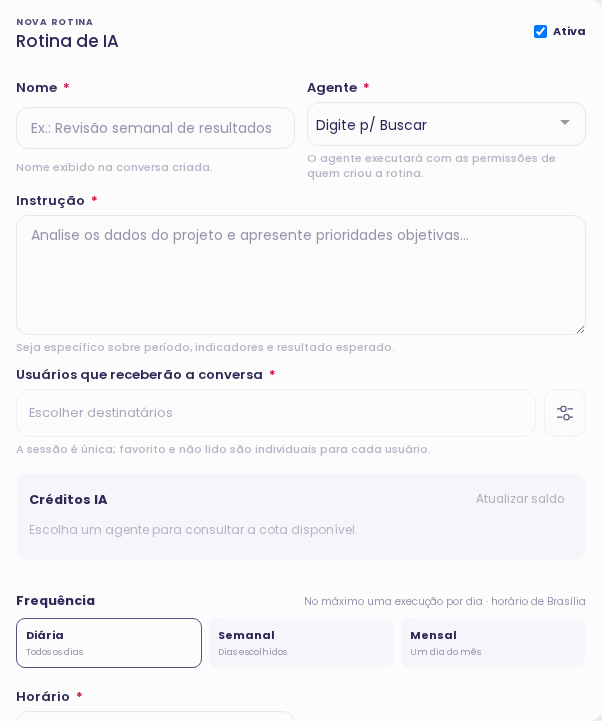
  • Daily, Weekly or Monthly Frequency
  • Agents prepared for scheduled execution
  • Sources and permissions of the routine manager
See how to apply in my operation
Real configuration of AI Rotinas in Agilize
HOW TO START

From your scenario to the correct configuration.

  1. Define the mission

    Choose a specific result and the audience that the agent will use.

  2. Preparing the context

    Configure instructions, sources, tools and access limits.

  3. Test the flow

    Valid answers, actions and the time to guide to a person.

YOUR NEXT STEP

How could this solution work for your team?

Tell us how your team works today. We’ll discuss ai agents for customer service and management and how to set it up for your operation.

  • Discuss your channels and processes
  • Understand the resources and configuration
  • Define next steps with our team
Your data will be protected No Spam

Talk to our team

BEFORE THE NEXT STEP

Answers to decide with clarity.

Understand how the solution fits into your operation.

Discuss Your Scenario

Two people collaborating in front of a laptop
Are Internal Assistant and Internal Assistant the same?

There are different uses. The service agent participates in the flow with the customer; the internal assistant supports people in the team. The configuration determines the public, knowledge, tools and permissions.

Can the agent change the CRM data?

Operating agents may have CRM capabilities, activities and agenda when released. Actions and confirmation controls depend on the configuration and permissions; a text suggestion does not mean that an action has been executed.

Can I use the context of conversations and transcriptions?

The agents can work with the context and the sources available for your goal. Our team helps map the service, transcription and the data that should be accessible for the desired analysis.