Customer service, sales, and AI in one place.
AI in Agilize

AI where your team needs it.

Connect conversations, calls and data to artificial intelligence. Transcription, insights, writing support and analysis routines to meet with context and decide more clearly.
14-day test period, no credit card required, and guided implementation.
The team defines what questions the agent makes and how the conversation follows.
FROM THE PLATFORM TO YOUR ROUTINE

Intelligence is part of work.

AI monitors service and management, with resources for those who converse with the customer and those who track results.

01

Understand every attention

Convert audio into text and see insights about conversations and calls.

02

Answer more clearly

Improve scripts and prepare answers with context and communication tone.

03

Keep the analysis in day.

Use agents and AI workflows to review results and share priorities.

COPY OF WRITING

A good answer begins with the context.

Use the sketch, the context of the conversation and the available guidelines to prepare a response that your team review before sending.

  • Improve text or generate a new response
  • Choose from four tons of communication
  • Check the content before sending
See how to apply in my operation
Content Copilot
Chatbot Draft

Tell me the day and how many people will be on the visit?

Copilot suggestionFriendly tone

Of course! To schedule a visit, you can tell me the date and how many people will be in the group?

RECURRENT ANALYSIS

The analysis you need, at the pace of the operation.

Set up a daily, weekly or monthly routine. Define the question, the agent and the recipients; the result comes in a shared conversation with the people chosen.
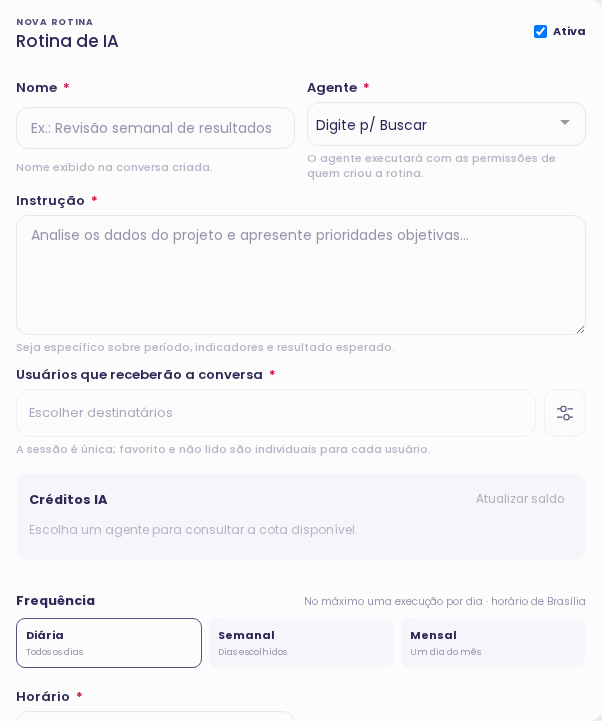
  • Reviewing results and priorities of the sales pipeline
  • Instructions with defined period and objective
  • Execution according to permissions and available credits
See how to apply in my operation
Real-time AI workflow form with instruction, recipients, and frequency
HOW TO START

From your scenario to the correct configuration.

  1. Choose the goal

    Observation, writing, analysis of results or recurring routine.

  2. Connect the context

    Configure the sources, agents and team permissions.

  3. Revise and advance

    Read insights and suggestions before turning the analysis into action.

YOUR NEXT STEP

How could this solution work for your team?

Tell us how your team works today. We’ll discuss ai in agilize and how to set it up for your operation.

  • Discuss your channels and processes
  • Understand the resources and configuration
  • Define next steps with our team
Your data will be protected No Spam

Talk to our team

BEFORE THE NEXT STEP

Answers to decide with clarity.

Understand how the solution fits into your operation.

Discuss Your Scenario

Two people collaborating in front of a laptop
Does AI send all automatic responses?

In the Copilot writing tool, AI prepares the text, and your team reviews and sends. Service flows with agents follow the operation's configuration, including human routing.

What data can AI consult?

The context depends on the agent, the released sources and the permissions of who uses the resource.The assistants have no unlimited access to the company’s data.

Can I program recurring analyses?

Yes. The AI workflows allow for daily, weekly, or monthly executions with enabled agents and defined recipients. Execution depends on credits and project configuration.